Rift vs Discord, side by side
Discord is the biggest community chat platform on the internet. We're not pretending otherwise. This page is a factual comparison of what each one does, where Rift comes out ahead, and where Discord still wins.
Last updated June 2026. Discord changes; we'll keep this page updated.
The 30-second version
Choose Rift if
- →You run a community and don't want to chase 14 boosts every month.
- →You want a desktop client that stays out of the way, using a fraction of Discord's RAM even counting WebView2.
- →You don't want to give an email, phone number, or ID to chat with friends.
- →You want E2EE direct messages.
- →You want widgets (music, weather, calendar) inside the same window as chat.
- →You want a platform with no ads and no data sales, not one that sells you to advertisers.
Stay on Discord if
- →All of your friends and communities are already there and you have no interest in moving.
- →You rely on a specific bot ecosystem (custom MEE6 setups, music bots, game integrations, etc.) that you don't want to give up.
- →You're under 18. Rift is an 18+ platform.
- →You need Activities, Discord-specific game integrations, or other vendor-locked features.
Desktop
Lighter where it counts
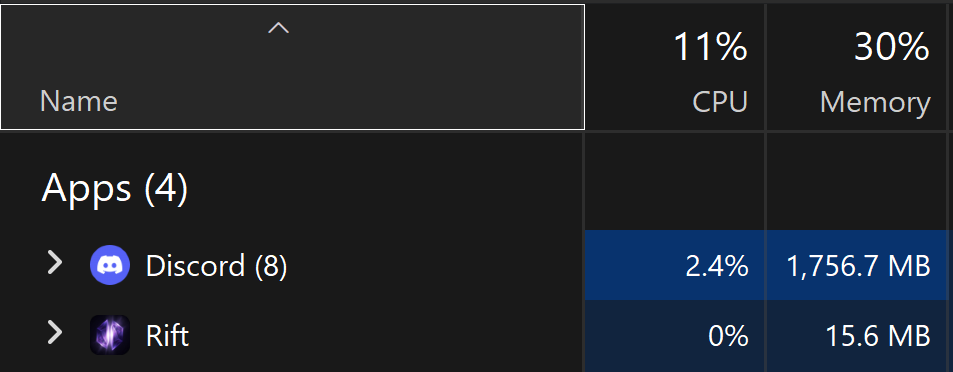
Same machine, same session. Task Manager doesn't lie. Rift's native shell shows up as one line item. Discord rolls up eight processes and nearly 1.8 GB of RAM just to sit there.
16 MB
Rift native
What the screenshot shows
1,757 MB
Discord
8 processes, idle
~7×
Less RAM
Even counting WebView2 (~250 MB total)
What about WebView2?
The screenshot only shows Rift's native shell. The chat UI runs inside WebView2, Microsoft's shared Chromium runtime on Windows. It usually appears separately in Task Manager as a WebView2 Manager group and adds roughly 200-250 MB on top of the native process.
That's the full picture: about ~250 MB total versus Discord's ~1.8 GB in this capture. Still roughly seven times lighter, and Rift doesn't ship its own copy of Chromium the way Electron apps do.
Your numbers will vary by OS, open Portals, voice channels, and uptime. This is a real capture, not a benchmark lab.
Identity & Privacy
Signup, encryption, and what we keep.
Sign up requires
Rift
Username + password
Discord
Email or phone, plus date of birth
Phone verification
Rift
Never
Discord
Often required for new accounts
Age verification by ID
Rift
No
Discord
Rolling out in several regions
Account recovery
Rift
12-word Rift Key
Discord
Email reset
DM text encryption
Rift
End-to-end (Signal-style X3DH/Double Ratchet)
Discord
Transport encryption only
DM attachment encryption
Rift
Encrypted at rest (not full E2EE yet)
Discord
Encrypted at rest
IP address logging
Rift
Never stored; HMAC fingerprint destroyed in 7 days
Discord
Retained for abuse/legal purposes
Personalization / ads
Rift
None (no ads, no data sales)
Discord
Personalized by your activity + servers; sponsored Quests
License to your content
Rift
Delivery only; no AI training (stated in ToS)
Discord
Licensed to "develop and improve" services; sublicensable
AI reading your messages
Rift
None; no AI summarizes or profiles your chats
Discord
AI Summaries (beta) reads + summarizes server channels
Pricing
Free-tier defaults and what it costs to upgrade.
Free tier file uploads
Rift
50 MB
Discord
10 MB
Free tier audio bitrate
Rift
96 kbps
Discord
64 kbps
Free tier screen share
Rift
720p 60fps
Discord
720p 30fps
Free message length
Rift
8,000 chars
Discord
2,000 chars
Personal subscription
Rift
Rift+ at $7/mo
Discord
Nitro at $9.99/mo
Community boost model
Rift
One owner pays
Discord
Up to 14 members each pay
Top community tier cost
Rift
$25/mo flat (1 person)
Discord
14 boosts; ~$50 to $140/mo depending who pays
Top community tier streaming
Rift
1440p 60fps
Discord
1080p 60fps
Desktop footprint
Same class of app (Chromium-based chat client). Very different weight.
Idle desktop RAM (same machine)
Rift
16 MB (Rift native shell)
Discord
1,757 MB (Discord, 8 processes)
UI renderer (Chromium)
Rift
~200 MB (WebView2 group, shared runtime)
Discord
Bundled inside Electron processes
Realistic worst-case total
Rift
~250 MB
Discord
~1.8 GB
Visible app processes (Task Manager)
Rift
1 entry (+ WebView2 group)
Discord
8 grouped processes
Desktop engine
Rift
WebView2 (system Chromium)
Discord
Electron (bundled Chromium)
Service worker / offline cache bloat
Rift
None on desktop
Discord
Electron app cache + updates
Runs while minimized to tray
Rift
Yes (notifications stay live)
Discord
Yes
Features
What each platform does, including where Discord still leads.
AutoMod
Rift
Built-in, with sandbox testing
Discord
Built-in (basic) + third-party bots
Ticket / support channels
Rift
Built-in channel type
Discord
Requires a bot
In-character / anonymous posting
Rift
Personas in opt-in channels, still fully moderatable
Discord
Requires a third-party bot (e.g. Tupperbox)
Owner leaves, is banned, or goes inactive
Rift
Ownership auto-passes to the next eligible member
Discord
Server can be orphaned; recovery means contacting support
Leveling & XP rewards
Rift
Built-in: roles + channel unlocks, anti-farm caps, free for every Shard
Discord
Requires a bot (MEE6 / Arcane)
Giveaways
Rift
Built-in, provably-fair draw + encrypted code delivery
Discord
Requires a bot (GiveawayBot / MEE6)
Creator go-live alerts
Rift
Channel announcements via Twitch EventSub, auto-updating card
Discord
Personal "Now Live" status; channel alerts need a bot
Temp voice rooms (join-to-create)
Rift
Native launchers: a room spawns on click, auto-deletes when empty
Discord
Requires a bot (TempVoice / VoiceMaster)
Stream Deck control
Rift
Official plugin: mute, deafen, PTT, leave, soundboard, over a local token-secured bridge
Discord
Unofficial third-party plugin only, not built or supported by Discord
Forum channels
Rift
Yes
Discord
Yes
Gallery channels
Rift
Yes (lightbox, grid, reactions)
Discord
Limited (media channels)
Announcement channels
Rift
Built-in channel type, any Shard
Discord
Requires switching the server to Community mode
Widgets / mini-apps in chat
Rift
Portals (music, weather, calendar, etc.)
Discord
No equivalent
Workspace & windows
Rift
Dock, float, or pop chats & Portals into OS windows across monitors
Discord
Fixed layout; limited call/stream pop-out
Voice infrastructure
Rift
Self-hosted; no third party receives your audio
Discord
Third-party infrastructure
Link preview IP exposure
Rift
Proxied; your IP never hits the linked site
Discord
Direct fetch from your client in some cases
Server analytics
Rift
Shard Command Center (free tier included)
Discord
Server Insights, only after switching to Community mode
Community discovery
Rift
Any Shard can self-list, free, no member minimum
Discord
Needs Community mode plus a member-count minimum
Bot ecosystem
Rift
Limited (features are built in by design)
Discord
Massive (millions of bots)
User base size
Rift
New (Open Beta)
Discord
200M+ MAU
Existing communities
Rift
You bring or build them
Discord
Almost certainly already there
What "Community mode" actually costs
Several of the tools above (Server Insights, announcement channels, and discovery) are only available on Discord once you convert a server into a "Community" server. Per Discord's own setup requirements, enabling Community also turns on a verification level that requires members to have a verified email before they can send messages, and switches on an Explicit Media Content Filter that scans the media members post.
On Rift, every Shard gets those tools with no mode to switch on. And because Rift never asks for an email or phone number in the first place, there's nothing for your members to verify.
Thinking about moving a community?
A few things to know before you do.
Roles and channels port over conceptually
Rift uses Shards instead of "servers," and the role / permission model is similar enough that mods will feel at home. The permission editor has a three-state allow / deny / inherit model with a built-in inspector.
Your structure imports in one step
Make a server template on Discord, paste the link into Rift, and it rebuilds the whole thing as a new Shard: categories, channels in order, forum tags, roles with their colors and order, and every permission rule that has a Rift equivalent. You get an editable preview before anything is created. Structure only, so messages and members do not come across, and your Discord server is never touched.
Your bots won't follow
Rift bakes a lot of bot functionality into the platform (AutoMod, tickets, audit logs, polls, analytics). Custom bots that do something unique don't have an equivalent yet. If your community lives or dies by a specific bot, plan around that.
Getting members through the door is quick
The usual migration killer is convincing everyone to create yet another account. Rift signup is a username and a password, no email verification loop, no phone check, so a member who clicks your invite is in the room about a minute later.
Try Rift for yourself
Sign up with a username and password and poke around. If it's not for you, you've lost nothing but a few minutes.
Discord is a trademark of Discord Inc. Rift is independent and is not affiliated with, endorsed by, or sponsored by Discord. This comparison reflects publicly available information about Discord together with our own hands-on testing as of June 2026. Features, pricing, and limits on both platforms change over time, so the figures here are point-in-time snapshots and your own results (for example, desktop memory use) will vary. If you believe anything on this page is inaccurate or out of date, email [email protected] and we will review and correct it.